
Means of payment
Welcome to the “Payment Methods” section.
Here you’ll find answers to frequently asked questions about paying for your toll products.
Whether it’s a vignette, section toll, or subscription – learn which payment methods are accepted. You’ll also get help with changing your payment method or dealing with failed transactions.
All questions - Means of payment
We offer the following payment options:
Card Payment
We accept:
American Express
Diners Club
Mastercard/Mastercard Debit
Visa/Visa Debit
3-D Secure
3-D Secure makes credit card payments in the shop even more secure. As the cardholder, you will be authenticated by entering a TAN or another security feature known only to you and your bank or card issuer.
Payment via eps
Payments via eps are possible from Austrian bank accounts.
Payment via PayPal
If you have selected PayPal as your payment option, you will be redirected to PayPal, where you will be prompted to log in to your PayPal account. After logging in, you can confirm the payment.
Payment via Amazon Pay, Apple Pay, and Google Pay
If you use one of these payment services, you can pay for your products with us conveniently.


For the Digital Subscription, you can use the following payment methods:
Available payment methods:
Card Payment (American Express, Diners Club, Mastercard/Debit Mastercard, Visa/Debit Visa)
Amazon Pay
PayPal
Automatic payment:
The stored payment method will automatically be used when the subscription is renewed.
Tip:
Update your payment method in time (e.g., if your credit card expires). This ensures that the next payment is processed and your subscription continues without interruption.
You can update your payment method at any time directly via your ASFINAG account.
Steps to update your payment method:
Log in to your ASFINAG account.
Click on „My Account“ and then select „My Payment Methods“.
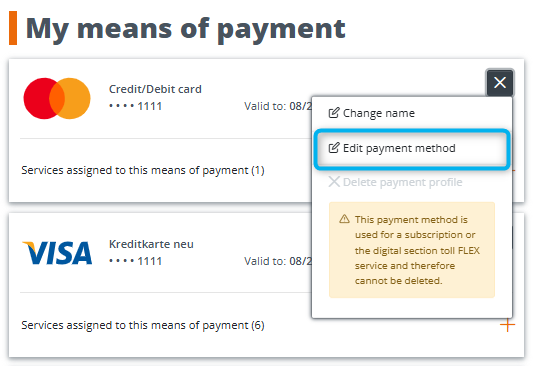
To add a new payment method, click on „Add New Payment Method“ and enter the details of the new payment method, or update existing details by clicking the gray button next to the respective payment method.
Form for updating an existing payment method:
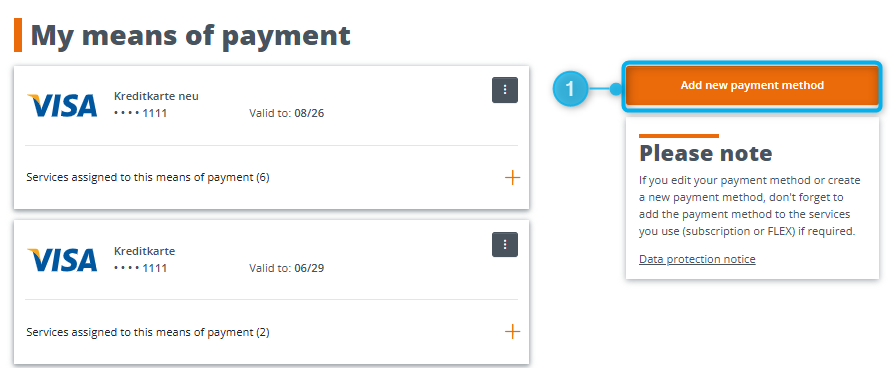
Step-by-step guide for adding a new payment method:
1. Click on „Add New Payment Method“.
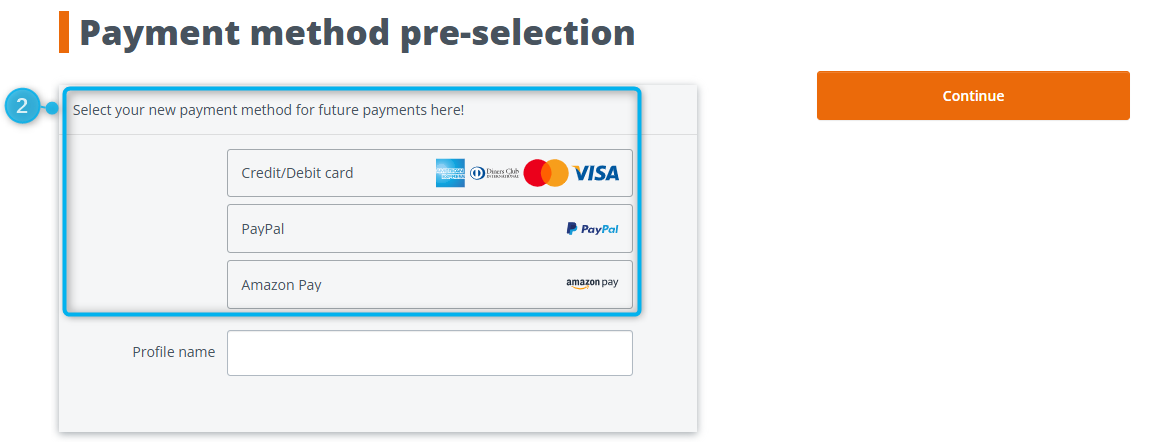
2. Select your new means of payment for future payments and click "Continue".
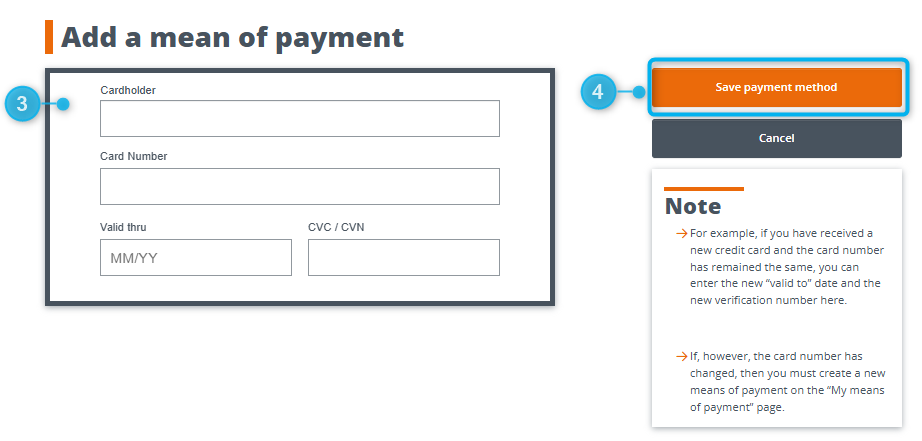
3. Enter the details of the new payment method.
4. Click on „Save Payment Method“.
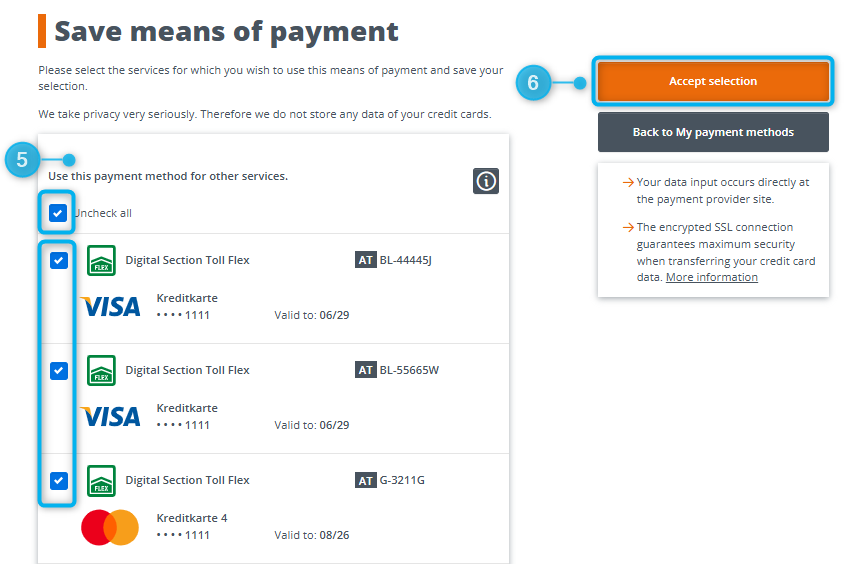
5. Select which services (e.g., Digital Vignette, Digital Toll FLEX, Digital Subscription) you want to use this payment method for.
6. Check the desired options and click on „Save Selection“.
Important Notes
Updating a credit card: If only the expiration date or security code of the card has changed, you can easily update these details.
If the card number has changed, you must add a new payment method.
You can adjust the payment method for your Digital Subscription at any time directly via your ASFINAG account.
Log in to your ASFINAG account.
In the „Services“ menu, select the „My Subscriptions“ section.
Click on „Payment method for annual billing“ for the desired subscription and then on the pencil (edit symbol).
If another payment method is already saved:
It will automatically be suggested as an option.
If you want to add a new payment method:
Click on „Add new payment method“.
Assign a profile name so you can easily recognize the payment method later.
(For privacy reasons, the system does not display full card or account numbers.)Follow the displayed steps and click on „Save payment method“.
Select which services you want to use this payment method for.
Check the relevant options and click on „Save selection“.
You can change the payment method for FLEX directly via your ASFINAG account.
Log in to your ASFINAG account.
Open „Services“ and select FLEX services.
Select the license plate for which you want to change the payment method.
Click on the pencil (edit symbol) next to the payment method.
If you want to add a new means of payment, click on "Create new means of payment".
Assign a profile name to make it easier to recognize the means of payment later.
(For privacy reasons, the system does not display full card or account numbers.)Follow the steps displayed and click on "Save means of payment".
Then select which services the means of payment should be used for.
Check the appropriate boxes and click on "Save selection".
If the payment for FLEX fails, it is usually due to an invalid (blocked/expired) or insufficiently funded payment method.
Steps to change the payment method for FLEX:
Receive a notification
If the payment could not be processed, you will receive an email at the address registered in your ASFINAG account.[PA1]
Additionally, a notice about the outstanding amount will appear in the „Services / FLEX Services“ section.Your license plate will be marked as „invalid“
In the vignette record, all license plates associated with this payment method will be displayed with the status „invalid“.
This indicates that the payment method is invalid.You have 14 days to make a supplementary payment and update the payment method
If you make the payment within 14 days and add a valid payment method to your account, the service will remain active.
How to make a supplementary payment:
Log in to your ASFINAG account.
Open the „Services / FLEX Services“ section.
You will see the outstanding amount there.
Pay the amount and add a valid payment method.
If you do not make the payment and do not add a valid payment method, the FLEX service will be automatically blocked after 14 days.
That means:
The service will be blocked for all license plates in your account.
The license plates will no longer be registered for the FLEX service.
The outstanding amount will remain and must be paid later.
Supplementary payment is possible within 28 days via the Mautshop.
Note:
If payment is not made within 28 days:
A substitute toll will be issued to the vehicle owner.
The affected trip will be removed from the calculation period.
What to do in case of a block?
You can reactivate the FLEX service in your account (with a valid payment method).
Alternatively, you can purchase a digital special toll product or pay directly at the toll station.